tiktok video search: how to find any video, and what it can't do
updated 11 nov 2026
to search tiktok, tap the search button at the top of the app, type what you want and tap search: the top tab shows the most relevant results, and other tabs split them into videos, users, sounds, live and hashtags. to narrow it down, tap the … button, then filters, and sort by relevance, popularity or recency. what tiktok's search doesn't show is which videos beat their account's usual views, or instagram reels next to them.
how do you search tiktok videos?
open search
in the tiktok app, tap the search button at the top.
type and search
enter words, a hashtag, a sound or a name, then tap search. the top tab shows the most relevant results.
pick a tab
results are split into tabs such as top, videos, users, sounds, live and hashtags. for videos only, use the videos tab.
add filters
tap the more options … button at the top, then filters. you can sort by relevance, popularity or recency, or only show creators you follow or have interacted with. tap apply.
there's also screenshot search: take a screenshot of a post inside the app and tap the thumbnail to see visually similar posts and products. tiktok says it's only for people 18 and over who are logged in.
how does tiktok's search engine rank videos?
tiktok says videos in search are sorted by a mix of factors, including how relevant they are to your search and engagement. relevance comes from things like the caption, text in the video and hashtags.
so a tiktok keyword search matches the words people put in captions, on screen and in hashtags. if you want your own videos found, say your keyword in all three. to see which searches people actually make, tiktok has a tool for creators: creator search insights.
how do you use tiktok search to find what's working?
search what your viewer would type
plain words, like "study tips" or "matcha latte at home". tiktok matches them against captions, on-screen text and hashtags.
sort by recency
use the recency filter to see what's working now, not what worked two years ago.
check the account, not just the video
tap through to the creator and look at their other posts. if they usually get 2k views and this one got 500k, the idea worked. if they usually get 400k, it's a normal post for them.
note the first line
write down the first words and the text on screen of the ones that beat their usual. our tiktok hooks guide has more.
is there a tiktok advanced search?
the filters above are what tiktok offers. none of tiktok's help pages we read mention a few things you'll want when you're researching, not just watching:
- a sort by views. the filters tiktok lists sort by relevance, popularity or recency. to find the most-viewed videos for a search, you open them one by one.
- how a video did for its account. 500k views is huge for an account that usually gets 2k, and ordinary for one that gets 400k. tiktok doesn't show an account's usual next to a result. see how many views is viral for why that matters.
- reels at the same time. it only searches tiktok, so the same idea on instagram needs a second search there.
how do you search tiktok by views?
searchtok searches tiktok and instagram reels in one go. type a topic the way you would in tiktok, and every result shows its views and how many times its account's usual views it got (the outlier score). sort by outlier score, views or newest, and filter by platform, format, account size or when it was posted. it works on the web, and inside claude and chatgpt if you'd rather ask.
here's one search for "study tips", run on 11 november 2026. two tiktoks from small accounts and one reel from a big one:
-
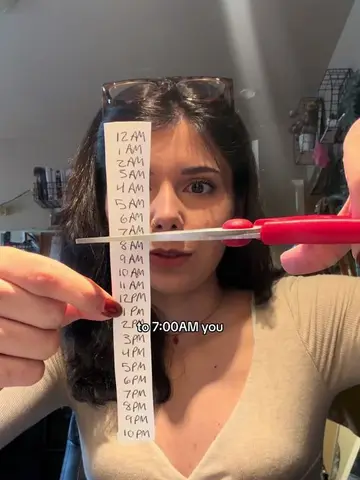 tiktok
small account
"So from 11:00PM to 7:00AM you should be sleeping."
@dallasstudydiaries
- 2.1m views
- 649.6x the account's usual
- usual: 3.3k views
a hook, then a demo of a study website.
watch · numbers read 11 nov 2026
-
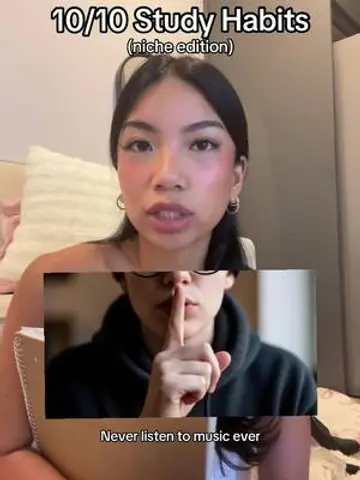 tiktok
list
"10/10 Study Habits (niche edition)"
@denny.studies
- 1.9m views
- 277.1x the account's usual
- usual: 6.8k views
- 141k saves
watch · numbers read 11 nov 2026
-
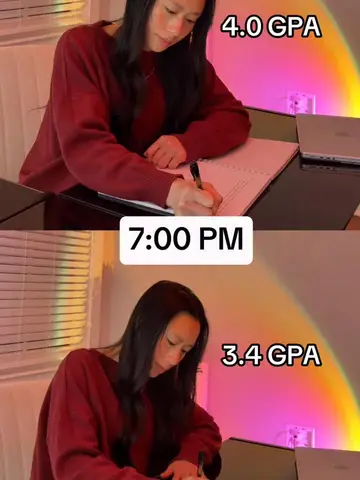 instagram
reel, big account
"4.0 GPA 7.00 PM 3.4 GPA"
@ultimateivyleagueguide
- 955k views
- 5.4x the account's usual
- usual: 175k views
fewer views than the tiktoks, still 5.4x its usual. a tiktok-only search wouldn't show it.
watch · numbers read 11 nov 2026
real examples, numbers from searchtok and the public ad libraries.
searches to run in searchtok
- or your niche
- skincare routinesmall businessbudget apphome workout
questions people ask
how do i search tiktok videos?
tap the search button at the top of the app, type a word, hashtag or name and tap search. switch to the videos tab for videos only, and use the … button, then filters, to sort the results.
does tiktok have advanced search?
it has filters: sort by relevance, popularity or recency, and show only creators you follow or have interacted with. for views next to every result, account size or reels in the same search, you need a separate tool such as searchtok.
can you search tiktok by views?
not that tiktok lists. its filters sort by relevance, popularity or recency. searchtok shows the views on every tiktok and reel it finds and sorts by them, or by how far each beat its account's usual.
is tiktok a search engine?
it works like one for videos: you type words, and tiktok sorts videos by relevance (captions, text in the video, hashtags) and engagement. it only searches tiktok.
how do you do a keyword search on tiktok?
type the keyword in the search bar and tap search. tiktok matches it against captions, on-screen text and hashtags, so search the words a creator would actually write: "study tips", not a full question.
sources
last checked: november 2026